
Minecraft Bedrock / MCPE Public Server List
Public Bedrock and MCPE server browser for Windows and mobile, focused on public-server discovery.
Browse public/community Bedrock servers by region and language.
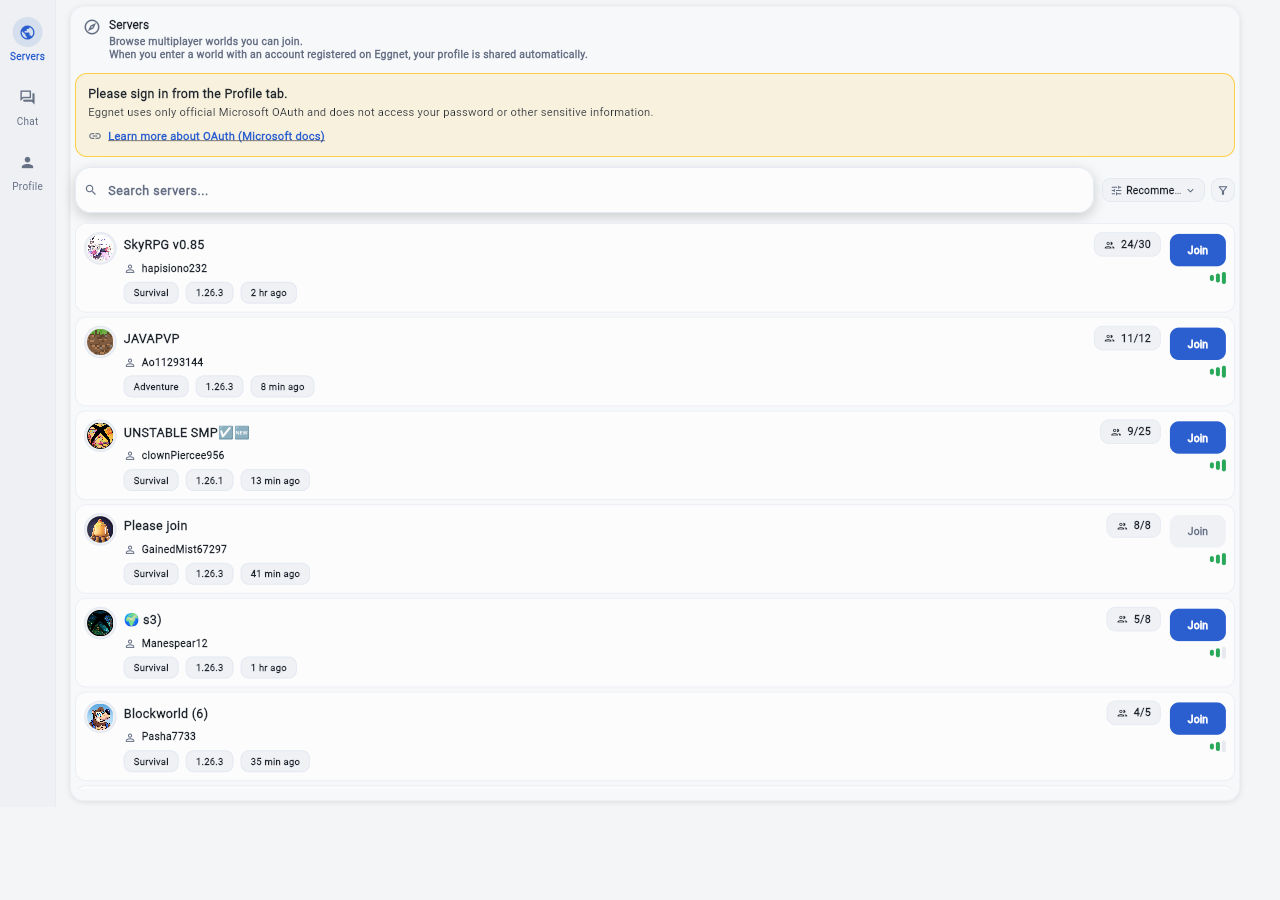
Looking for an Omlet Arcade alternative for Minecraft Bedrock? Start by separating three jobs: private Friends or Realms play, public server discovery, and older host-your-own-world apps. Eggnet handles the public-server side. It helps Bedrock and MCPE players narrow active public servers before they switch into the in-game join path.
Use this page to separate public/community servers from private worlds, reduce the shortlist by region and language, and continue to the live Eggnet route once you know which multiplayer path you actually need.
Bedrock multiplayer usually splits into four lanes: Friends or Realms for private worlds, public/community servers for open play, local-world sharing tools that bridge beyond local Wi-Fi, and older social or minigame apps that wrapped streaming or chat around the game. Use Friends or Realms when you already know the host and want a private world. Use a public-server browser when you want active community spaces, party options, or a backup if one server drops. Use a local-world sharing or LAN/VPN bridge workflow when your goal is publishing your own world, not browsing public servers.
Confirm the server still looks active and not stale before you commit a party to it. Check language fit, region, and party size so you do not walk into the wrong community. If you do not have exact IP/port or Add Server details yet, shortlist first and copy the exact details only after you pick a public server. If your real goal is sharing your own private world, switch to a host/bridge workflow instead of treating a public-server browser as the same thing.
How Bedrock multiplayer usually works
Bedrock multiplayer usually splits into four lanes: Friends or Realms for private worlds, public/community servers for open play, local-world sharing tools that bridge beyond local Wi-Fi, and older social or minigame apps that wrapped streaming or chat around the game. Use Friends or Realms when you already know the host and want a private world. Use a public-server browser when you want active community spaces, party options, or a backup if one server drops. Use a local-world sharing or LAN/VPN bridge workflow when your goal is publishing your own world, not browsing public servers. Keep Java searches separate; these pages are written for Bedrock / MCPE / Pocket Edition style multiplayer.
What to check before you join
Confirm the server still looks active and not stale before you commit a party to it. Check language fit, region, and party size so you do not walk into the wrong community. If you do not have exact IP/port or Add Server details yet, shortlist first and copy the exact details only after you pick a public server. If your real goal is sharing your own private world, switch to a host/bridge workflow instead of treating a public-server browser as the same thing.
What usually matters more in real play
Short time from search to the first good public server. A clear split between private worlds, public servers, and host-your-own-world tools. Low friction when switching between Windows and mobile players.
Related guides
Open the guide that matches what you are trying to do next.
- How to find active Minecraft Bedrock / MCPE public serversIf you do not have exact IP or port yet, start with region and language, then compare active Bedrock and MCPE public servers for Windows and mobile.
- How to find low-ping Minecraft Bedrock / MCPE serversCheck nearby regions first and keep only consistent low-latency Minecraft Bedrock options.
- How to compare Minecraft Bedrock servers before joiningUse activity, freshness, language fit, and latency as core Bedrock public-server criteria before you move to exact server details.
- Best Omlet Arcade alternative for Minecraft Bedrock / MCPEUse this when you are comparing an Omlet Arcade replacement for Bedrock or MCPE and need to separate public-server discovery from private hosting or social layers.
- How to add a Minecraft Bedrock server with IP and portUse this when the Bedrock Add Server screen asks for server name, address, and port, and you need to separate exact server details from general public-server browsing.
- Fix "Unable to connect to world" in Minecraft Bedrock / MCPEIf a Bedrock public server, Friend world, or Realm will not open, reset session state, verify Xbox account/profile state, confirm version match, and test one more active candidate to separate client, world, and server issues.
- Minecraft Bedrock & MCPE Public Server FAQGet quick answers for Bedrock, MCPE, and Pocket Edition public servers, Friends and Realms differences, join errors, local-world sharing tools, and Omlet Arcade alternative searches.